While reviewing the Microsoft Defender portal, I found something I had not planned for: employees were already using local AI coding agents, including Claude Code and Codex CLI, on managed Windows endpoints.
The tools were visible. The control was missing.
That matters because a local agent does not behave like a normal chat window. It runs with the user’s privileges and can read repositories, local files, web content and tool responses. Supported agents can also invoke tools and commands. A malicious instruction hidden in otherwise legitimate content can therefore become an endpoint action, not just a bad model response.[1][3]
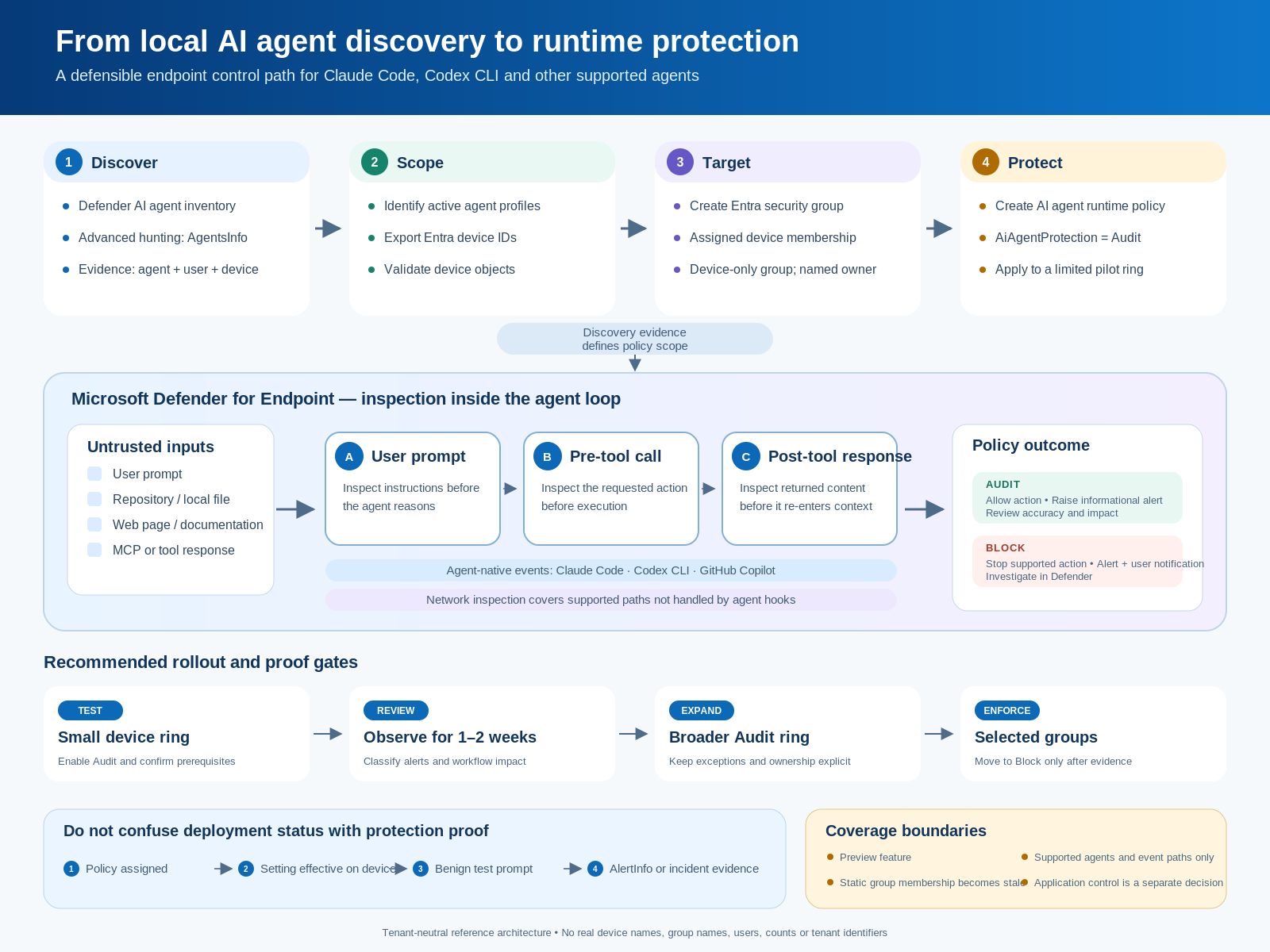
I used that discovery to build a small, evidence-led control path:
- Find active local AI agents with Defender Advanced Hunting.
- Resolve the Windows devices behind those agents.
- Put the validated devices in an assigned Microsoft Entra security group.
- Assign Microsoft Defender AI agent runtime protection in
Auditmode. - Verify the effective setting and generate a known benign detection before considering
Block.
I have deliberately removed policy names, device names, usernames, tenant identifiers and fleet counts from this article. The diagram below is a tenant-neutral reconstruction of the implementation, not a screenshot of the production portal.
Why this is worth treating as an endpoint-security control
Microsoft Defender can automatically discover supported local AI agents and associated MCP server configurations on onboarded devices. The inventory can associate an agent with its device and account, while the AgentsInfo table gives defenders a hunting surface for agent metadata and local-agent configuration.[1][2]
Discovery is not protection. It tells you where an agent exists. Runtime protection is the separate control that inspects supported points in the agent loop:
- the user prompt;
- the requested tool call before execution; and
- the tool response before it continues through the agent context.[3]
For agents that expose vendor-supported event interfaces, Defender uses agent-native events. Microsoft currently lists Claude Code, Codex CLI, GitHub Copilot CLI and the GitHub Copilot app for this path. Network inspection is a separate protection method for supported agents that do not expose those interfaces.[3]
That distinction matters. The endpoint policy I created configures AiAgentProtection, which is the agent-native inspection control. It should not be described as universal coverage for every AI application or every network path.
Prerequisites I checked first
Microsoft’s current setup guidance lists these main requirements for runtime protection:[4]
- Microsoft Defender for Endpoint Plan 2, Microsoft 365 E5, Microsoft Agent 365 or Microsoft 365 E7;
- devices onboarded to Defender for Endpoint;
- Microsoft Defender Antivirus in active mode with real-time protection enabled;
- supported Windows and current Defender platform, engine and security intelligence;
- at least one supported local AI agent; and
- the required Intune, Defender and alert-investigation permissions.
I also kept the pilot small. This is still a preview feature, and it sits directly in developer and administrator workflows.
Step 1: build a current agent-to-device inventory
Defender’s local-agent guidance recommends filtering AgentsInfo to Platform == "LocalAgents", taking the most recent row per AgentId, and excluding deleted or uninstalled profiles.[2]
This is the query pattern I use to produce a device-level export. The column_ifexists() calls make the display-name projection more tolerant of preview schema naming changes:
let LocalAgentProfiles =
    AgentsInfo
    | where Platform == "LocalAgents"
    | summarize arg_max(Timestamp, *) by AgentId
    | where isempty(LifecycleStatus)
        or LifecycleStatus !in~ ("Deleted", "Uninstalled")
    | extend Local = RawAgentInfo.localAgentMetadata
    | extend Agent = coalesce(
                 tostring(column_ifexists("Name", "")),
                 tostring(column_ifexists("AgentName", ""))),
             Vendor = tostring(Local.vendor),
             DeviceName = tostring(Local.deviceName),
             EntraDeviceId = tostring(Local.aadDeviceId),
             AccountName = tostring(Local.accountName),
             AutoApprove = tostring(Local.autoApprove),
             TrustedProcess = tostring(Local.trustedProcess);
LocalAgentProfiles
| where Agent has_any ("Claude", "Codex")
| summarize
    Agents = make_set(Agent, 20),
    Vendors = make_set(Vendor, 20),
    Accounts = make_set_if(AccountName, isnotempty(AccountName), 20),
    AutoApproveValues = make_set(AutoApprove, 5),
    TrustedProcessValues = make_set(TrustedProcess, 5),
    LastSeen = max(Timestamp)
    by DeviceName, EntraDeviceId
| project DeviceName, EntraDeviceId, Agents, Vendors,
          Accounts, AutoApproveValues, TrustedProcessValues, LastSeen
| order by LastSeen desc
I reviewed the complete local-agent inventory before applying the Claude/Codex filter. The filter is a scoping decision, not a claim that other agents are safe.
For the group-membership working file, I retained only what was necessary: device name, Entra device ID, observed agents and last-seen time. User/account data is useful during risk review, but it is not needed to add a device object to a deployment group.
Step 2: turn hunting evidence into a controlled deployment ring
I created a Microsoft Entra group with:
- Group type: Security
- Membership type: Assigned
- Members: device objects only
- Purpose: limited AI-agent runtime-protection pilot
- Owner: a named operational owner
- Review point: a documented date for refreshing membership
Intune supports Entra security groups with assigned or dynamic membership. Microsoft also advises against mixing users and devices in the same group because it can produce confusing policy behavior.[7]
I used an assigned group because Defender’s observed local-agent state is not a native Entra dynamic-device attribute. The trade-off is important: the group is a point-in-time deployment ring. It will become stale unless the hunt is rerun and membership is reviewed.
A stronger operating model is:
Scheduled hunt -> reviewed device delta -> group membership change
-> policy status -> effective-setting check -> detection test
Do not silently automate that entire chain on day one. A false match in discovery should not become an unreviewed production enforcement change.
Step 3: create the runtime-protection policy
I used the Microsoft Defender portal policy inventory:
https://security.microsoft.com/policy-inventory?osPlatform=Windows
The policy path is:
- Select Create new policy.
- Select Windows.
- Select Microsoft Defender AI agent runtime protection.
- Configure Ai Agent Protection as Audit.
- Assign the Entra device security group.
- Review and save.
The same agent-native setting can be deployed from Intune through an Endpoint security > Antivirus policy. Policies created in the Defender portal can target Intune-enrolled devices and devices managed through Defender for Endpoint security settings management. For the latter, Microsoft requires device-object targeting; user targeting is not supported.[4][6]
The Defender portal route has two practical limitations: its wizard does not support Intune scope tags or assignment filters. If those are required, create or edit the policy in Intune instead.[6]
Why I started with Audit
In Audit mode, Defender allows the supported action to continue but records the detection and raises an informational alert. In Block mode, Defender can stop a supported action before it runs and raises an alert based on assessed risk.[3][4]
Microsoft’s recommended rollout is sensible:
- test in Audit on a small set of devices;
- review alerts for one to two weeks;
- expand Audit to more device groups; and
- move selected groups to Block only after detections are accurate and actionable.[4]
The policy page in my pilot showed successful setting processing and successful device check-in. That confirmed delivery progress. It did not by itself prove that prompt injection would be detected.
Step 4: verify the control at four different layers
A policy is not finished when the portal shows green. I used four proof gates.
1. Assignment and check-in
Review the policy’s assigned groups, policy-setting status and applied-device status. This catches targeting, conflict and delivery problems, but it is still management-plane evidence.
2. Effective setting on the device
Open the device in Microsoft Defender portal, then go to:
Configuration management > Effective settings > Ai Agent Protection
Confirm both the effective value and its configuration source. Microsoft documents this as the device-level verification path.[4]
For a local check on an authorized test endpoint:
Get-MpPreference |
    Select-Object AiAgentProtection, AiAgentNetworkInspection
Close existing agent and terminal sessions after enabling the control, then start a new terminal session before testing. Defender’s documentation calls out this restart step.[4][5]
3. Benign prompt-injection demonstration
Microsoft publishes a benign test prompt specifically for validating this feature. Run it only on an authorized test device and tenant. An agent refusing the prompt is not sufficient proof; the evidence must appear in Defender or Windows protection history.[5]
4. Defender alert evidence
Microsoft’s demonstration uses this hunting query to find the detection:[5]
AlertInfo
| where Timestamp > ago(24h)
| where Title has "AI prompt injection"
      or Title has "Suspicious AI prompt injection"
| project Timestamp, AlertId, Title, Severity, Category, ServiceSource
| order by Timestamp desc
In Audit mode, the expected Defender alert is informational. In Block mode, severity is based on the assessed risk. Related alerts can be correlated into incidents for normal SOC investigation.[4]
A documentation conflict worth knowing about
Microsoft’s July 2026 Defender for Endpoint release note says agent-native event inspection works with standard platform and engine update channels, so Beta channel configuration is no longer required.[8]
However, the current setup and demonstration pages still instruct administrators to place public-preview test devices on the Beta platform and engine channels.[4][5]
I would not resolve that contradiction by moving a broad production ring to Beta. Use a limited test ring, check the current documentation at implementation time, verify the installed Defender versions, and treat the benign demonstration plus Defender alert as the deciding evidence. Preview documentation and prerequisites can change faster than normal operational standards.
What this policy does not solve
This control is valuable, but its boundary is narrow:
- it covers supported agents and supported inspection paths;
- the policy template configures agent-native inspection, not every network-inspection scenario;
- inventory or policy success does not prove a detection path works;
- it does not decide whether the software itself is approved;
- it does not replace application control, least privilege, data-loss controls, repository permissions or MCP governance; and
- a static device group requires membership maintenance.
If an agent executable must not run at all, that is an application-control decision. Runtime protection and software allow/deny policy are different controls.
The operating standard I would keep
My final operating sequence is:
Discover -> classify -> scope -> Audit -> prove -> review -> Block selectively
The senior part is not creating the policy. It is preserving the evidence chain:
- why each device is in scope;
- who owns the deployment ring;
- which mode is active;
- what the effective device setting is;
- whether a known benign test produced Defender evidence;
- how false positives and exceptions are handled; and
- when static membership is refreshed.
That turns a preview switch into a controlled endpoint-security capability.
Sources
[1] https://learn.microsoft.com/en-us/defender-endpoint/local-agent-discovery-overview — Local AI agent discovery with Microsoft Defender for Endpoint [2] https://learn.microsoft.com/en-us/defender-endpoint/discover-local-ai-agents — Discover local AI agents with Microsoft Defender for Endpoint [3] https://learn.microsoft.com/en-us/defender-endpoint/ai-agent-runtime-protection-overview — AI agent runtime protection with Microsoft Defender for Endpoint [4] https://learn.microsoft.com/en-us/defender-endpoint/configure-ai-agent-runtime-protection — Set up AI agent runtime protection with Microsoft Defender for Endpoint [5] https://learn.microsoft.com/en-us/defender-endpoint/defender-endpoint-demonstration-ai-agent-runtime-protection — AI agent runtime protection demonstration [6] https://learn.microsoft.com/en-us/defender-endpoint/endpoint-security-policies-configure — Manage endpoint security policies in Microsoft Defender for Endpoint [7] https://learn.microsoft.com/en-us/intune/fundamentals/tenant-administration/add-groups — Use groups to organize users and devices for Microsoft Intune [8] https://learn.microsoft.com/en-us/defender-endpoint/whats-new-in-microsoft-defender-endpoint — New features in Microsoft Defender for Endpoint